

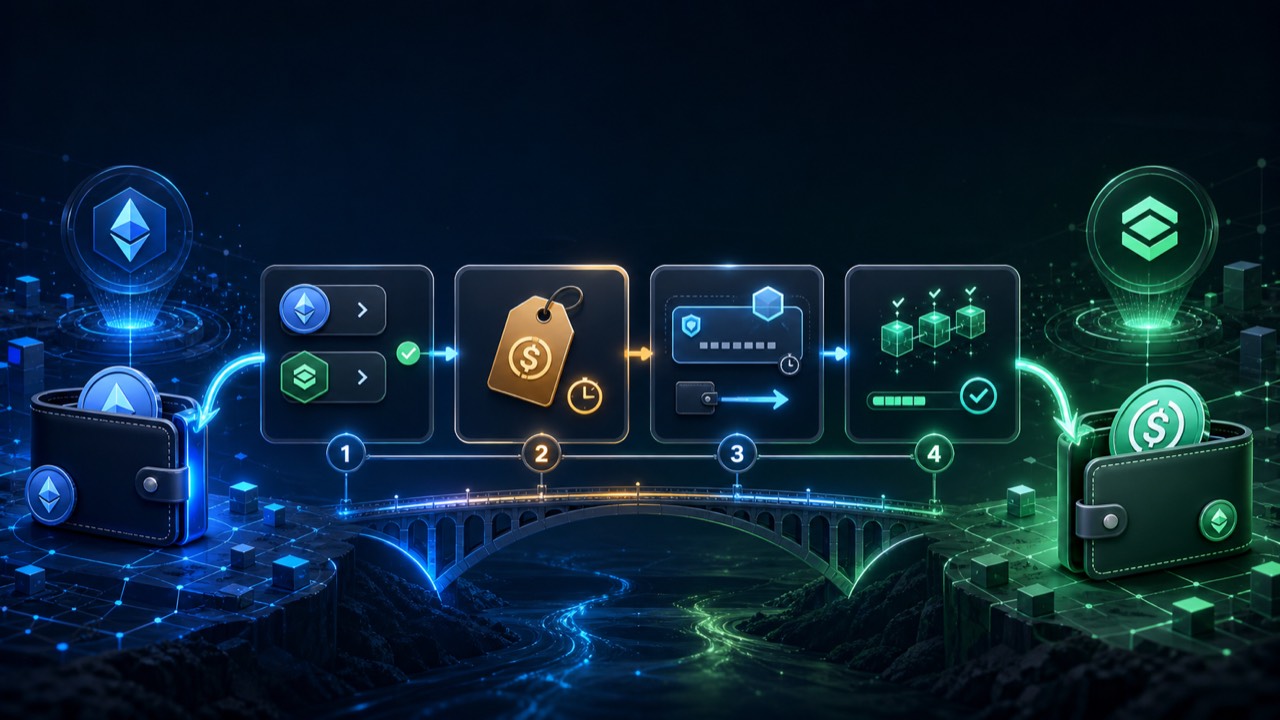
Step 1 — Decide what you're moving and where
Choose two things: the source (the asset you have + the chain it's on) and the destination (the asset you want + the chain you want it on). They can be the same asset on different chains (a pure bridge) or different assets on different chains (a cross-chain swap). AllSwap handles both in the same flow — same widget, same screens.
If the destination asset is also new to you, double-check its contract address before you continue. The token symbol "USDC" exists on many chains; the underlying contract differs by chain and by version (native vs. bridged). The widget shows the canonical version by default, which is what 95% of users want.
Step 2 — Get an all-in quote
Enter how much you want to send. The quote screen shows three things: the exact amount you'll receive on the destination chain, the estimated time end-to-end, and a single all-in fee. The number you see is what arrives in your wallet — bridge fees, gas estimates, and the service fee are already baked in. The quote is locked for 30 minutes so you have time to fund the deposit without watching the rate.
If the amount is below the route's minimum (some bridges set floors for safety), the screen will say so and tell you the minimum — no silent failures.
Step 3 — Send to the one-time deposit address
Paste the destination address you want to receive on. The widget then shows a one-time deposit address — generated fresh for this order. Copy it, switch to your wallet, and send the exact source amount to that address. No wallet-connect, no signature popups: you just send from your own wallet like any other transfer.
Verify twice: the deposit address and the chain you're sending on. Sending the right amount to the wrong chain is the #1 way people lose funds in cross-chain — the deposit address shown is valid only for the specific source chain quoted.
Step 4 — Wait for confirmation and receive
The widget tracks your deposit in real time. Once the source chain confirms (Ethereum: 1-3 minutes, Bitcoin: 10-30 minutes, Solana: seconds), routing kicks in: the assets are moved through the chosen path, swapped if needed, and settled to the destination address.
You can close the tab — the route runs server-side and on-chain; nothing depends on your browser staying open. When the destination address fills, you're done. If the route can't complete (rare; bridge stall, liquidity dry-up), the source amount is automatically refunded to where it came from.
Common mistakes to avoid
Sending less than the deposit amount: bridges generally reject under-funded deposits — they wait, you wait, and you'll need support to release them. Send the exact amount shown.
Sending the right amount but on the wrong source chain: every deposit address is chain-specific. If you have USDT on both Ethereum and Tron, make sure your quote is for the right one before you copy the address.
Using an exchange withdrawal as the source: most exchanges add memo / tag requirements that the deposit address doesn't have a slot for. Send from a self-custody wallet whenever possible.
Pasting the destination address from clipboard without checking: address-swap malware exists. Verify the first and last 4 characters match what you intended.
FAQ
Do I need gas on the destination chain to receive?
No. The routing engine settles the destination asset to your address; there's no contract call required from you on the destination chain to claim it.
Can I bridge from a centralized exchange directly?
Usually yes for the transfer itself, but watch for memo/tag fields and exchange minimum withdrawal limits. Sending from a self-custody wallet is simpler.
What if the destination address has a typo?
Crypto addresses are not reversible — once funds arrive at the typo address, they're gone unless that address belongs to someone willing to return them. Always paste the address from the destination wallet itself, never type it; verify first/last 4 characters.